Revenue & Resource Forecast Module
Last updated: November 26, 2025
Revenue and Resource forecast module can be used to forecast the total revenue that could be earned from the existing Projects and the required resources and hour that will require to achieve that.
The module is segregated into two parts:
n Existing Projects Forecast
n New Projects Forecast
1. Existing Projects Forecast:
This section is focused on forecasting revenue for projects that are already in progress.
Purpose: The forecast will be based on the remaining invoice amount, ensuring that no revenue forecast exceeds the value of what is left to be invoiced for the project.
Forecast Calculation:
The remaining invoice amount is calculated as:
Remaining Invoice Amount = Contract Amount - Invoiced Amount
The system uses this remaining amount to forecast the future revenue.
Restriction: The system ensures that the forecasted revenue for the project does not exceed the remaining value. This ensures that no over-forecasting occurs, which could lead to financial discrepancies.
2. New Projects Forecast:
This part focuses on forecasting revenue for new projects that are either in the planning stage or have recently started.
Purpose: To predict the potential revenue from upcoming new projects by uploading project details and values.
Forecast Calculation:
The forecast is generated based on the project value for each new project, as provided in the data upload.
Existing Project Forecast:
PDH Account > Project Planning > Action Dropdown > Revenue & Resource Forecasting
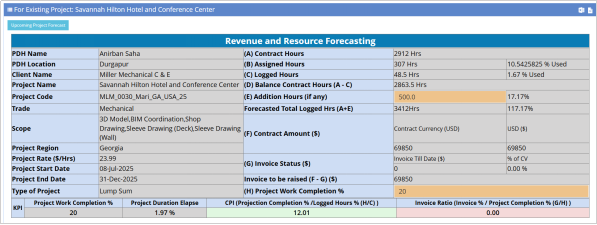
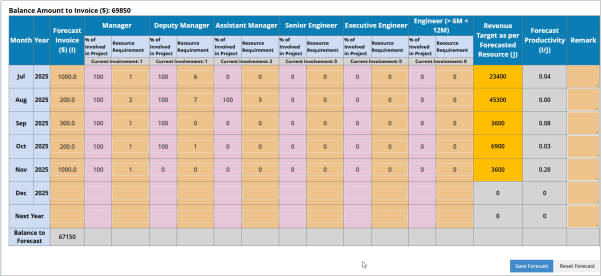
Click on “Revenue & Resource Forecasting” and it will be redirected to a page where all Project information is available. PDH has to fill the additional hours, actual work completion and upcoming months revenue for the selected Project. System will not allow to forecast more than the balance invoiced amount.
The Project specific report will be generated based on the data for each Project breakup.

Upcoming Project Forecast:
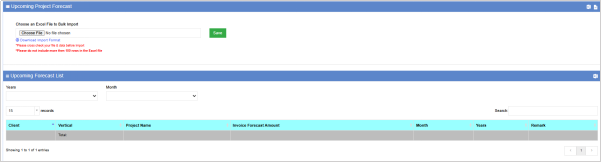
Click on the link “Upcoming Project Forecast” and download the import format. Fill the downloaded excel and upload to the System. System will save the data in a bulk.