Work from Home Policy:
Last updated: October 1, 2026
PURPOSE: The purpose of this Work from Home (WFH) Policy is to provide employees with flexibility to work remotely without compromising operational efficiency, project delivery timelines, or client communication. This policy outlines the eligibility, approval process, responsibilities, and performance expectations during the WFH period.
A. OBJECTIVE:
To maintain high project efficiency while providing controlled WFH flexibility.
To ensure all WFH activities are measurable, monitored, and aligned with delivery requirements.
To evaluate the effectiveness of WFH during a trial period before long-term adoption.
B. ABBREVIATION USED:
Term | Meaning |
WFH | Work From Home |
PDH | Project Delivery Head |
PCH | Production Centre Head |
FH | Functional Head |
BPMS | BIM Project Management System |
IT | Information Technology |
BOPT | Board of Practical Training |
C. ELIGIBILITY CRITERIA:
Applicable to the Production Members only, who have direct efficiency measurement through the BPMS System.
All types of contracts executed by a single PDH.
Last month current project efficiency must be greater than 70%
Additional projects/employees may be considered for WFH with prior PCH approval, with assurance to meet the minimum target efficiency during WFH.
Trainees and BOPTs are not permitted to avail WFH in the first phase.
All eligible projects will be published on the 25th of every month. Employees may view the updated list by visiting the WFH Module in the BPMS Portal.
D. APPROVALS & PROCESS REQUIREMENTS:
PDH approval is mandatory to proceed with WFH.
All production employees shall submit Work from Home (WFH) requests exclusively through the BPMS portal. Applications submitted through email / HR-One or any other system or mode shall not be considered.
As per the original WFH scheme, those production employees who are not eligible for 2 WFH per week will still avail one (1) WFH per month and this must also be applied through BPMS only. This provision shall remain applicable irrespective of the employee’s eligibility status under the enhanced WFH criteria.
WFH Special Permission: A Special WFH request can be placed under the “Special Permission” category in BPMS developed by the team. WFH approval will be granted only after proper justification is submitted and approved by the respective Functional Heads / PCH.
All non-production employees shall continue to apply for One (1) day Work from Home (WFH) per month through the HR One portal only, in accordance with the existing HR policy and applicable guidelines.
Employees serving their notice period shall not be eligible to avail Work from Home (WFH) facilities. Any WFH request submitted by an employee under notice period shall not be approved, and the respective Project Delivery Head (PDH) shall ensure such requests are declined. This also applies for non-production employees.
Upon approval of a Work from Home (WFH) request in the BPMS system, the attendance of the approved employee shall be marked by the system. No further action shall be required from the employee/applicant for attendance marking.
PDH to review and submit weekly WFH employees list and their performance reports from BPMS.
E. CONTROL MEASURES:
Employees may avail a maximum of two days per week of WFH. These days may be clubbed with a weekend; however, if a person applies for Thursday and Friday, then they cannot apply for Monday and Tuesday for the coming week.
Actual efficiency during WFH must be a minimum 70%
All employees must log a minimum of 8.75 work hrs. in BPMS during WFH. Efficiency will be calculated based on the higher of 8.75 or the actual logged hours.
Respective PM/PDH must complete Resource planning and Revenue forecasting in BPMS.
Performance during WFH will be monitored and reviewed regularly. Eligibility of the Employees who do not meet the above efficiency criteria for consecutive 2 weeks will be reviewed by PDH for further WFH approval.
F. IT INFRASTRUCTURE REQUIREMENTS:
To ensure seamless productivity from home, employees must have minimum IT infrastructure at home, which includes a Laptop, a Secondary Display, and high-speed internet. Refer to “Annexure 01” for more details.
Employees must submit an IT infrastructure readiness at home before applying for WFH through BPMS. The process will be circulated shortly.
IT will provide remote VPN and MS Teams accounts to all eligible employees for close coordination.
G. LEADERSHIP OVERSIGHT:
WFH Mentor will be responsible for governance, monitoring, and performance review with the support of all Production Leads and Department Heads.
H. POWER TO AMEND:
The CEO/HR/Policy Approver reserves the right to amend/withdraw this policy anytime without assigning any reasons. The utility and interpretation of the policy will be at the sole discretion of the company management.
Annexure 01.
A. WFH – Minimum IT Infrastructure Requirements
1. Laptop Specifications
Processor: Intel Core i5 (10th Gen+) / AMD Ryzen 5+
RAM: Minimum 8 GB (16 GB Recommended)
Storage: 256 GB SSD or Higher
OS: Windows 10 / Windows 11 (64-bit)
Genuine Licensed Operating System
a. Alternative Acceptable Configuration
Intel Core i3 (8th Gen+) / AMD Ryzen 3+
RAM: Minimum 8 GB
Storage: 128 GB SATA/SSD
Genuine Licensed OS
2. Desktop Specifications
a. Recommended Configuration
Processor: Intel Core i5 (10th Gen+) / AMD Ryzen 5+
RAM: Minimum 16 GB (32 GB Recommended)
Storage: 512 GB SSD or Higher
OS: Windows 10 / Windows 11 (64-bit)
Genuine Licensed OS
b. Minimum Acceptable Configuration
Processor: Intel Core i5 (10th Gen+) / AMD Ryzen 5+
RAM: Minimum 16 GB
Storage: 256 GB SATA/SSD
Genuine Licensed OS
3. Security Controls
Endpoint Security Agent Installed
OS Updated with Latest Patches
4. Display Requirements
External Monitor: 21-inch or larger
5. Internet Connection Requirements
Speed: Minimum 20–50 Mbps Download
Upload Speed: Minimum 10 Mbps
Wired Broadband Preferred
Not Recommended: Mobile hotspot / USB dongles (unstable for VPN & remote tools)
6. Peripheral Requirements
HD Webcam
Headset with Mic & Noise Cancellation
Keyboard
Mouse
7. Power Backup
UPS: With surge protection for the desktop and monitor
Router connected to UPS: To maintain internet during short power cuts
8. IT Security Requirements
System must have updated Windows patches
Antivirus:
o Microsoft Defender
o Bitdefender Free
o Avast Free
Uninstall all free/third-party VPN apps (Examples: uTorrent VPN, ProtonVPN, Windscribe, etc.)
Uninstall free antivirus tools that conflict with VPN: (McAfee trial, 360 Total Security, etc.)
VPN Client: Only company-approved (e.g., FortiClient)
VPN will not work on outdated OS or 32-bit systems
8. Compliance & Support
Employees must report IT issues immediately
If any of the above requirements are not met, they must contact the IT team for clarification or support
IT reserves the right to restrict remote access if security policies are violated
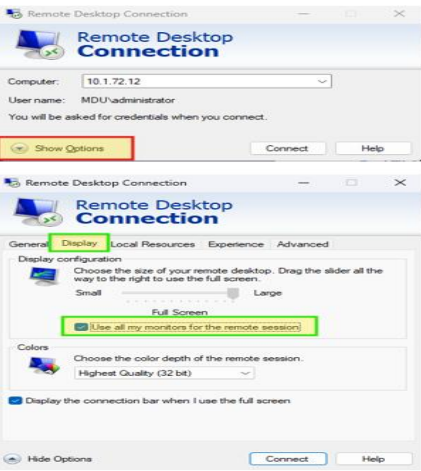
B. Guidelines to use Dual Monitor During Work from Home
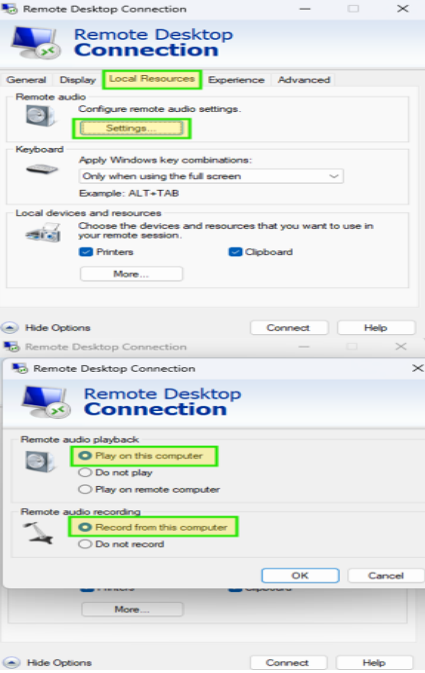
For remote audio and mic on the user's computer/laptop (Teams)