Project Profitability Data
Last updated: January 7, 2026
How to access:
Login to your P360 account > Project Dashboard > Project Profitability Data
Overview:
In the Project Profitability Dashboard, the first table, Project Details per PDH, focuses on how work is planned and executed for each project under a PDH. It shows contract-related details such as original contract hours and contract hours allotted to the PDH, along with execution data like assigned hours, completed assigned hours, and logged hours till date or up to last month.

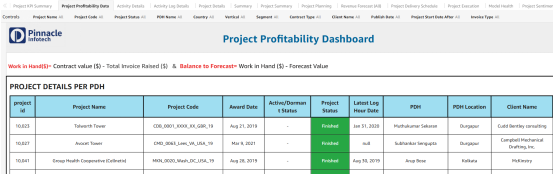


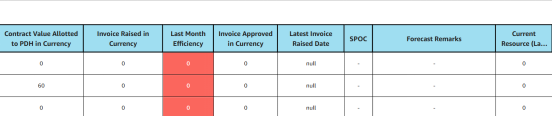
The second table, Project Details, explains the financial health of each project. It uses contract value, invoice, and forecast data to calculate key profitability indicators.




Key sections:
Project Completion % (SPI): Completed assigned hours vs contract hours assigned to the PDH
Efficiency: Completed Assigned hours vs. Logged hours
Work in Hand($): Contract Value - Invoice raised
Balance to Forecast($): Work in Hand - Forecast Value
Rev per MH: Sum of Invoice Raised vs. Sum of logged Hours