Fill Project Activity & View Project Activity
Last updated: November 27, 2025
The Project Activity module allows PMs to log the time spent on each project activity through Fill Project Activity and later review all previously recorded entries using View Project Activity, ensuring accurate tracking of task progress.
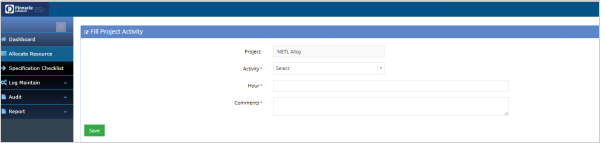
Fill Project Activity:
PM Account > Allocate Resource > Action Dropdown > Fill Project Activity
PMs can use this option to track time spent on various project activities, ensuring that all tasks are documented and the project’s progress is accurately recorded.
View Project Activity:
PM Account > Allocate Resource > Action Dropdown > View Project Activity
The "View Project Activity" option enables PMs to access and review previously logged project activities. It provides a quick overview of tasks, hours worked, and comments, allowing the PM to evaluate the project’s current status and make adjustments as needed.
