Allocate Resource Module
Last updated: November 27, 2025
PM Account > Allocate Resource
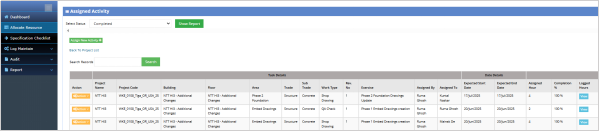
The Allocate Resource module in the Project Manager (PM) account is used to assign resources (such as team members) to various project activities. PMs can define specific tasks, allocate hours, and manage activity tracking to ensure projects stay on schedule. It helps in monitoring resource utilization, project progress, and overall task completion. Click on “View” to view the logged hours.

Area Zone:
PM Account > Allocate Resource > Action Dropdown > Area Zone
The "Area Zone" dropdown allows the PM to define and manage different zones or areas within a project. This section is useful for categorizing specific project areas, such as floors or sections, and helps track work related to each zone. By selecting an area zone, the PM can assign specific tasks or work to that zone and track the progress accordingly.

Assign To TM:
PM Account > Allocate Resource > Action Dropdown > Assign To TM
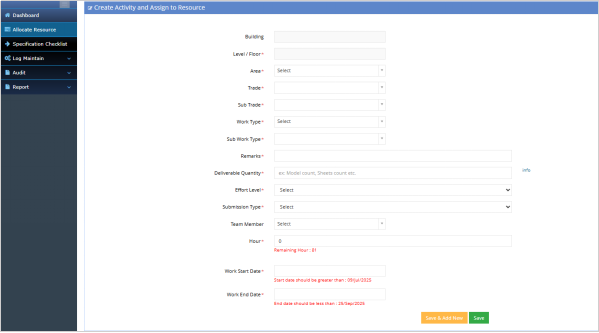
The Assign to PM section in the Allocate Resource module allows Project Managers (PMs) to create and assign specific activities to team members within a project. This section includes a form that enables the PM to define crucial details related to the task, such as the building and floor where the activity will take place, the trade and sub-trade involved, and the specific type of work required. The PM can also set the expected start and end dates for each activity, along with the total hours allocated.
A team member is assigned to the activity, and the required number of hours are logged to track resource utilization. By filling in these details, the PM can effectively allocate resources, track progress, and ensure the timely completion of tasks within the defined project schedule. This functionality ensures that all project activities are clearly defined, assigned, and managed, helping maintain project flow and organization.
View:
PM Account > Allocate Resource > Action Dropdown > View
The "View" option allows the PM to view the details of a selected project activity. This includes information about the task, team member, allocated hours, and progress. It's a way to quickly check the status and verify if resources are effectively utilized or if any adjustments are needed.